
Stash
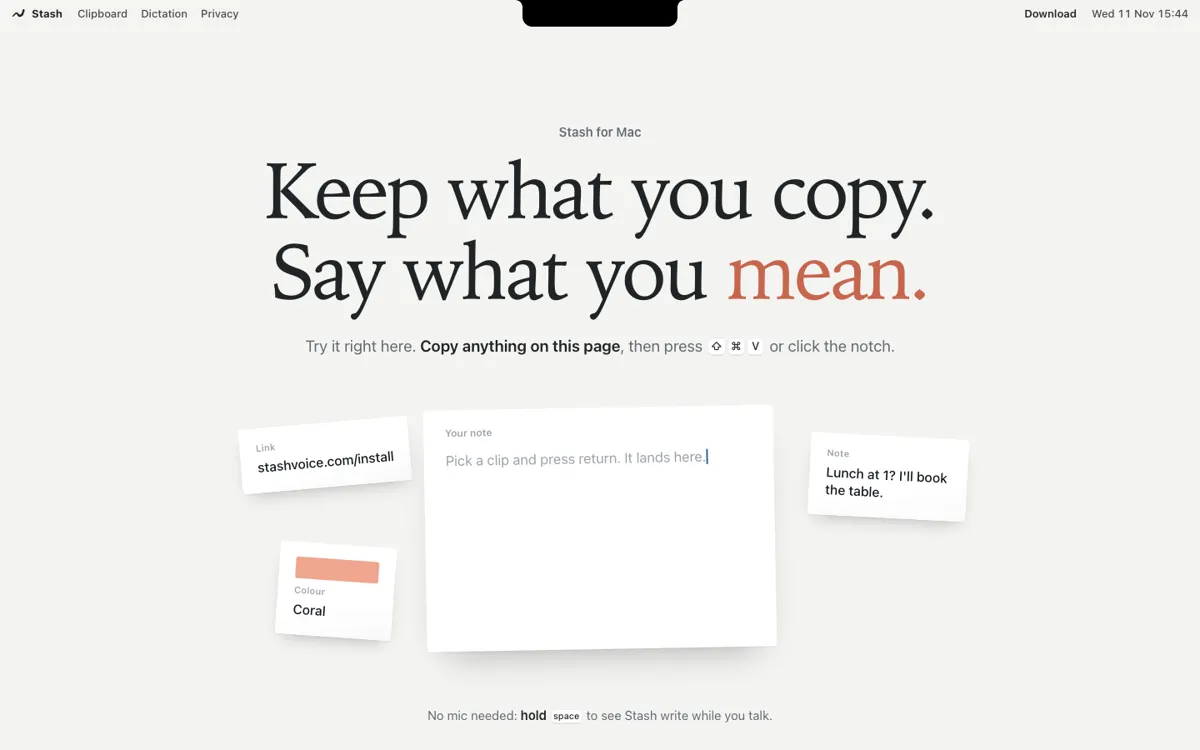
Keep what you copy.
Say what you mean.
Everything you copy, one shortcut away. Everything you say, written cleanly. All on your Mac, right at the notch.
Try it on this page first. Nothing to install.
Dana needs two things. Click them above to copy, then paste them here: ⌘V, or ⇧⌘V for everything you copied.Tap anything in Stash, and it lands on the sheet.
No mic needed: hold fn to see Stash write while you talk.
You just used Stash.
On your Mac it lives in the notch: one shortcut, everything you copied.
Don't search. Ask.
Found it. Press return and it's pasted where you were typing.
Ask Stash in plain words, like "the link Dana sent yesterday", and it finds the clip. Every clip here is made up.
Dictation
Say it messy. Get what you meant.
Hold fn in any app and talk like you talk. The “um”s, the restarts, the “no wait”: Stash writes what you meant, in the right style for the app you're in.
Hold fn
Example: you say “um so I think we should uh move the launch to Tuesday, no wait, Wednesday, and can you send the deck to Dana” and Stash writes “I think we should move the launch to Wednesday. Can you send the deck to Dana?”
Stash for your AI
Give your AI a memory.
Connect Stash to the AI apps you already use. They can look up what you copied and said, only when you let them.
src › api › types.ts
src › api.ts › sendInvite
Try your own question. It answers from a made-up clipboard.Also works with


What Stash does.





Ready when you are.
Join before Pro arrives, and everything Stash does on your Mac stays free for you, forever.
Download Stash for MacmacOS 14 or later · How to open it the first time